Operational intelligence for K‑12

Answer every question.Manage every asset.Streamline the rest.

When people don't know where to go for help, simple questions become bigger problems and create more work than they should. schoolOS makes it easier for people to get help while reducing the work required to make it happen.

Create one front door
Reduce manual coordination
Gain operational visibility
See it as a
schoolAgent AI assistant· not a person Help articles
Ask a question about your school…
Student, parent, teacher, and IT all see the same status, automatically.
Our design partners
Olympia School District logoOlympia School District
Lower Moreland Township School District logoLower Moreland Township SD
Ladue School District logoLadue School District
Massac Unit School District #1 logoMassac Unit SD #1Read their story
Washougal School District logoWashougal School District
Olympia School District
Lower Moreland Township SD

Ladue School District
Washougal School District
The problem

Requests Rarely Start in the Right Place

Questions and issues surface everywhere. Email. Chat. Hallway conversations. Tickets submitted to the wrong department.
‍
Teams spend too much time rerouting requests, gathering missing context, and manually coordinating across disconnected systems.

New request · 8:42 am · Room 12 “The smartboard in Room 12 is down”
Ticket #1042
Front office “Not us”
IT “Not IT, try facilities”
Facilities “Replacement, needs approval”
Unassigned Business office “Still waiting”
Time to resolution Day 1 Day 2 Day 3 Day 4
One request, four hops, no owner
New request · 8:42 am · Room 12 “The smartboard in Room 12 is down”
Ticket #1042
Front office “Not us”
IT “Not IT, try facilities”
Facilities “Replacement, needs approval”
Business office “Still waiting”
Day 1 Day 2 Day 3 Day 4
One request, four hops, no owner
New request · 8:42 am “The smartboard in Room 12 is down”
#1042
Front office “Not us”
IT “Not IT, try facilities”
Facilities “Replacement, needs approval”
Business office “Still waiting”
Day 1 Day 2 Day 3 Day 4
One request, four hops, no owner
New request · 8:42 am · Room 12 “The smartboard in Room 12 is down”
Ticket #1042
Front office “Not us”
IT “Not IT, try facilities”
Facilities “Replacement, needs approval”
Unassigned Business office “Still waiting”
Time to resolution Day 1 Day 2 Day 3 Day 4
One request, four hops, no owner
New request · 8:42 am · Room 12 “The smartboard in Room 12 is down”
Ticket #1042
Front office “Not us”
IT “Not IT, try facilities”
Facilities “Replacement, needs approval”
Business office “Still waiting”
Day 1 Day 2 Day 3 Day 4
One request, four hops, no owner
New request · 8:42 am · Room 12 “The smartboard in Room 12 is down”
Front office “Not us”
IT “Not IT, try facilities”
Facilities “Replacement, needs approval”
Business office “Still waiting”
Day 1 Day 2 Day 3 Day 4
One request, four hops, no owner
Location pin icon
People don't know where to go
Requests bounce between departments or land with the wrong team.
Routing arrows icon
Work must be routed manually
Teams spend too much time moving work between departments and systems.
Request form icon
Requests arrive without context
Teams gather missing information before work can move forward.
Ticket icon
Routine questions become tickets
Many issues don’t need direct support, but still take your team's time.
Diagram of district support requests from multiple channels converging on schoolOS as one front door
The SOLUTION
Start with One Front Door for Support

Make it easier to get answers and support across your district by giving teachers, staff, students, and families a single place to go for help. schoolAgent answers common questions, creates requests when support is needed, and automatically routes work to the right team.

Anyone asks
TeacherProjector in 214 won't connect
ParentCracked Chromebook before testing
StudentForgot my portal password
StaffNew hire starts Monday
AI does the work first

Agentic AI answers what it can and adds the missing context, so only real work gets routed.

schoolAgent

Right team, automatically
FacilitiesWork order · Room 214
Scheduled
ITRepair · loaner ready
In progress
AnsweredReset link sent
No ticket
HROnboarding started
Assigned
The root cause
Most District Support Problems are Coordination Problems

One front door makes it much easier to get help. But requests are scattered, routing is manual, and context goes missing for one reason: your operations live across tools that were never built to work together. So people become the middleware between them. The district runs because your team makes it run.

Hiring more staff can provide temporary relief. But it doesn’t address the root cause of the problem, so the work always comes back.

You need a better way to coordinate support across departments, systems, workflows, and channels.


The classroom today

Modern, AI-powered learning students can see.

The back office today

Manual workflows. Disconnected systems.
A better way
Run District Operations with Intelligence

schoolOS is the operational intelligence platform for K-12, powered by agentic AI. Instead of disconnected systems for support, assets, and workflows, everything runs on a single intelligent system that learns from your district's daily operations.

Requests are triaged automatically. Workflows advance on their own. Operational insight builds continuously.

Requests arrive
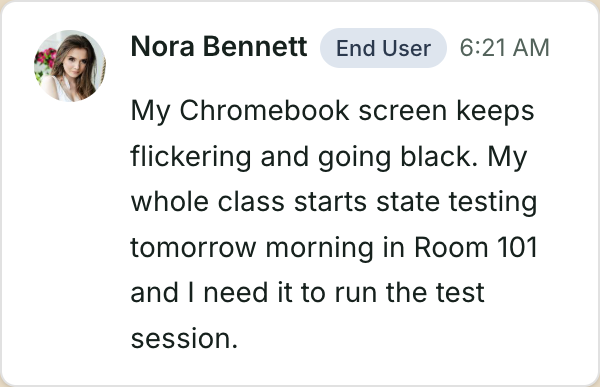
A teacher's request in schoolOS: My Chromebook screen keeps flickering and going black. My whole class starts state testing tomorrow morning in Room 101 and I need it to run the test session.
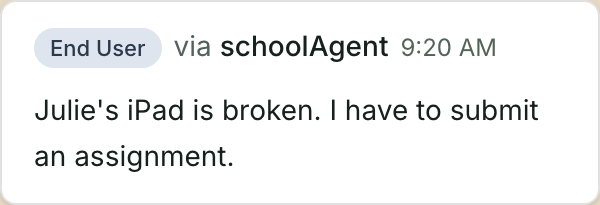
A request submitted through schoolAgent: Julie's iPad is broken. I have to submit an assignment.

Triaged automatically

schoolOSOperational intelligence
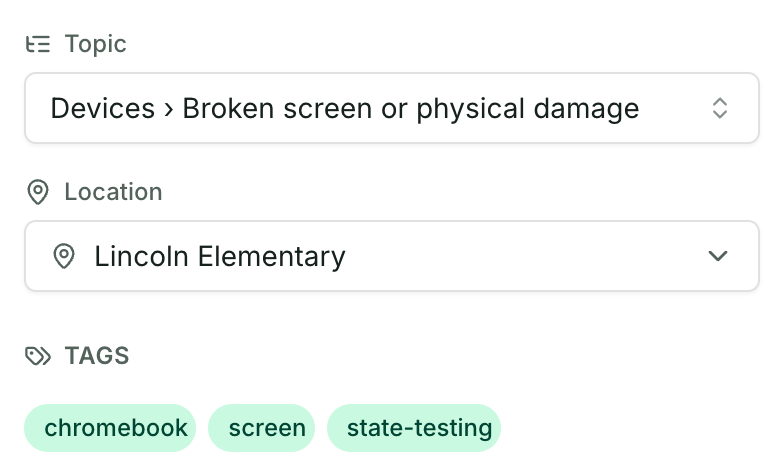
schoolOS fills in the ticket automatically: Topic Devices, Broken screen or physical damage. Location Lincoln Elementary. Tags chromebook, screen, state testing.
  • Understands the request, adds context
  • Routes work to the right team
  • Learns from every resolution

Work advances on its own

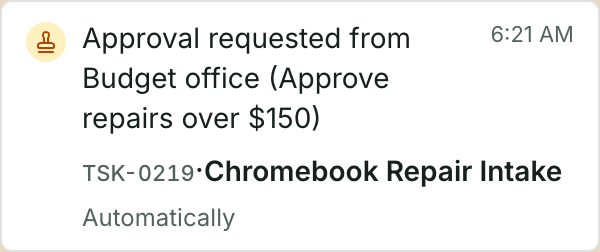
schoolOS starts the Chromebook Repair Intake workflow automatically and requests approval from the budget office for repairs over 150 dollars.
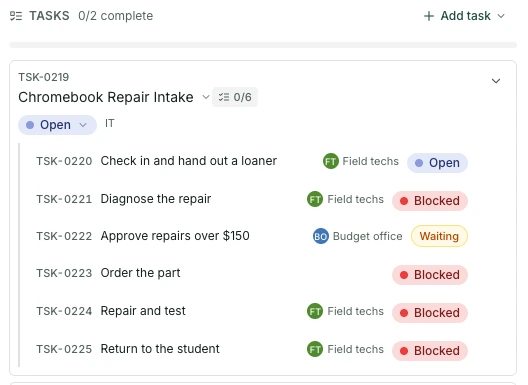
The Chromebook Repair Intake workflow in schoolHelpdesk, broken into six steps: check in and hand out a loaner, diagnose the repair, approve repairs over 150 dollars with the budget office, order the part, repair and test, and return to the student.

state testing in the request becomes a tagThe Chromebook issue kicks off the repair intake workflow
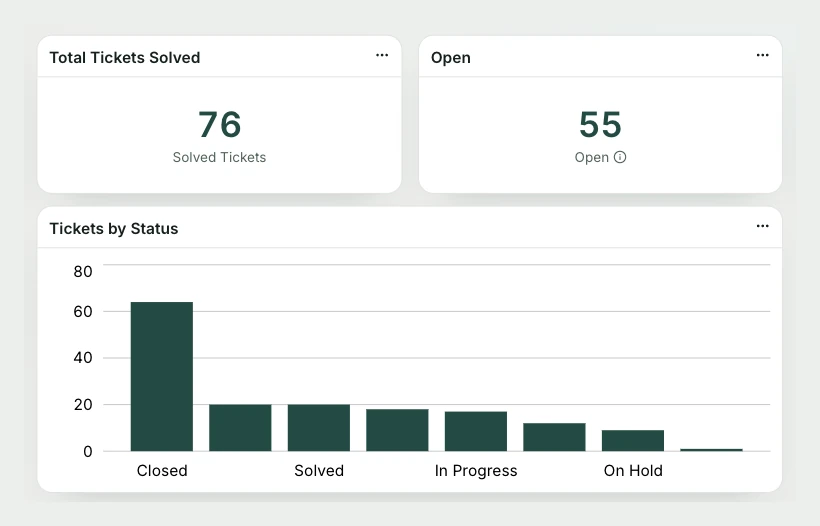
Operational insight builds continuouslyEvery request sharpens the picture of where work slows down, and why.
schoolOS ticket insights showing tickets solved, open tickets, and tickets by status

See District Operations Clearly for the First Time

Every support request creates operational data about where work slows down, where requests get rerouted, and where teams rely on manual coordination.

Over time, schoolOS helps you identify operational patterns, reduce bottlenecks, and deliver better service across your district.

Two on‑ramps
Two Starting Points,
One Destination

You’ve just seen both: the front door and the full platform. schoolOS meets your district where it is, and no matter where you begin, you arrive at the same place: deeper operational intelligence.

No rip and replace required. schoolOS works alongside the systems your district already runs.
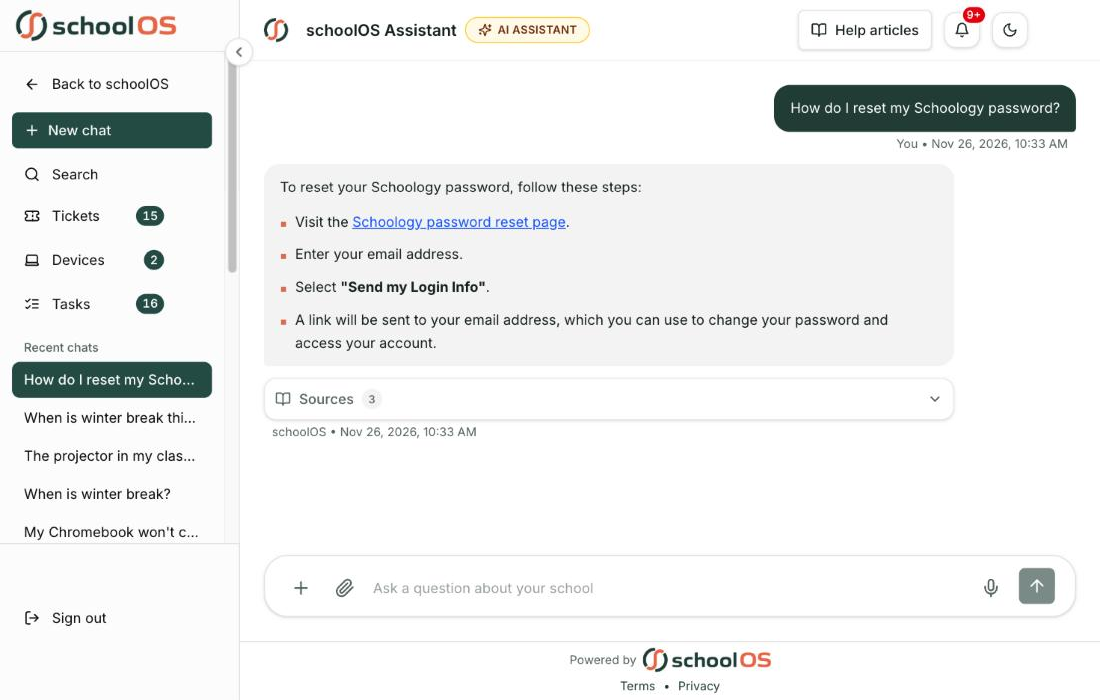
schoolAgent answering how to reset a Schoology password with steps from district help content and cited sources
Path one

Orchestrate

Provide one place for everyone to get help. Deliver better service, reduce tickets and manual coordination, and lay the groundwork for operational intelligence.

Explore schoolAgent
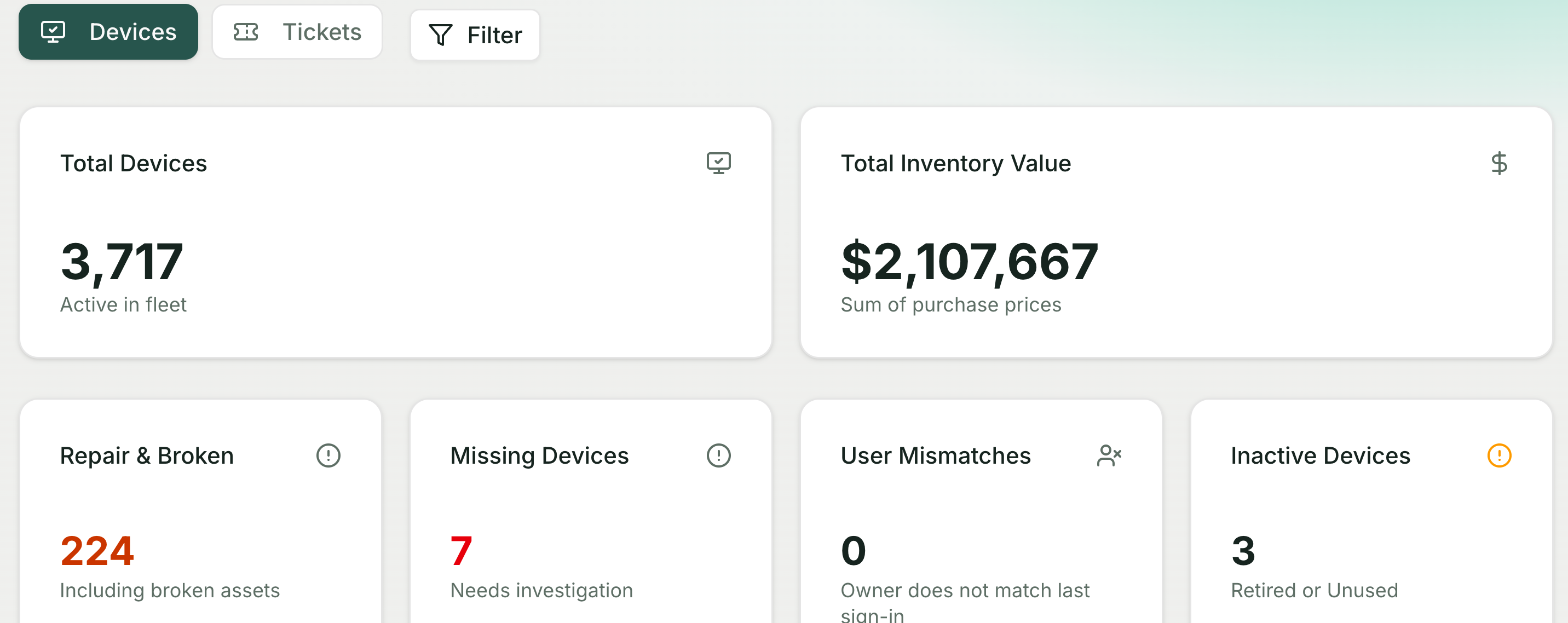
schoolOS IT dashboard showing total devices, inventory value, devices in repair, missing devices and user mismatches in one view
Path two

Consolidate

Bring school requests, district assets, and operational workflows together in one intelligent platform. Identify patterns, reduce bottlenecks, and build a clearer picture of operations across your district.

Explore the Platform
otto, the schoolOS AI Co-Pilot, winking
Meet otto

Ask a question. Get the answer.

No pulling reports or building lists. otto is schoolOS' in-app AI Co-Pilot, built into schoolAssets and schoolHelpdesk. Ask in plain language, and otto answers from your district's own device and ticket records.
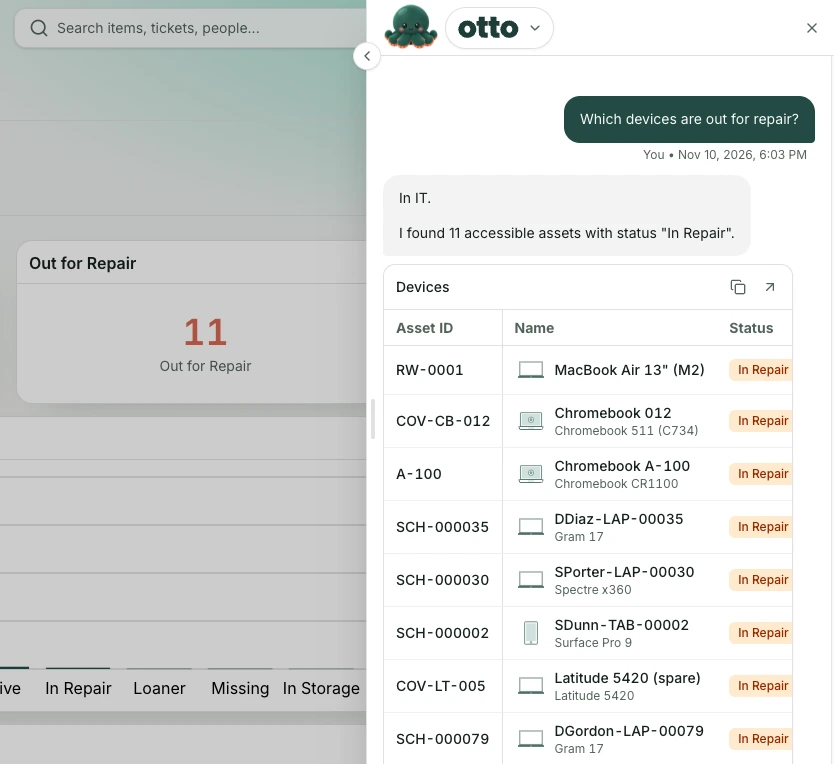

Which devices are out for repair?
Which devices are past their useful life, and what will it cost to replace them?
Which urgent tickets are still open?
Meet otto
otto answering which devices are out for repair with a list of the 11 devices in repair, next to the Out for Repair count on the schoolAssets dashboard
otto, the schoolOS AI Co-Pilot
”
From our design partners
“We always had a system. It just made everything a lot of work: pull reports, pull lists. schoolOS is the first tool that just gives us the answer.”
Marc Elliott
Marc Elliott · Olympia School District · 9,500 students
100,000+
devices tracked
10,000+
students in pilot districts
6
states with pilot districts
Most district support challenges are actually coordination challenges. When districts spend less time coordinating work, they can spend more time understanding it.
Rich Watson, Co-Founder and CEO of schoolOS
Rich Watson
Co-founder & CEO, schoolOS
Common questions

Questions districts ask about schoolOS

What is schoolOS?

schoolOS is operational software for K-12 school districts. It gives teachers, families, students and staff one front door for support. schoolAgent answers routine questions, creates requests when needed and routes them to the right team. schoolHelpdesk and schoolAssets manage tickets and devices, with otto, the in-app AI Co-Pilot, answering questions in plain language. schoolOS works alongside the systems your district already runs.

Is schoolOS a help desk for K-12 school districts?

Yes. schoolHelpdesk is K-12 ticketing built for district teams, with one queue, full context and automatic routing. Most districts start with schoolAgent in front of the help desk they already run, then consolidate ticketing and assets onto schoolOS later.

How does schoolOS reduce IT help desk tickets?

schoolAgent answers routine questions such as password resets, device issues and where to find district information before a ticket is created, and adds missing context to the requests that do need a person. A ticket analysis at Olympia School District found 42 percent of 18,385 annual tickets were routine or automatable.

Which systems does schoolOS integrate with?

schoolOS connects to the identity, MDM, SIS, help desk, network and messaging systems a district already runs, including Google Workspace and Microsoft environments. No rip and replace is required.

Is schoolOS safe to use with student data?

schoolOS is operational AI, not instructional AI. It works on tickets, assets and workflows and is trained without student PII. It never touches academic or behavioral records. schoolOS is FERPA, COPPA and FIPPA compliant and a person stays in command of consequential actions.

Have a question this page does not answer?Book a demo

Start with schoolAgent

See how schoolAgent can help your district deliver better service, reduce manual coordination, and lay the groundwork for operational intelligence.

Explore schoolAgent

schoolOS

See What’s Possible When You Have
Operational Intelligence

Want to deliver better service, allocate resources more effectively, and
make smarter operational decisions?

Book a Demo
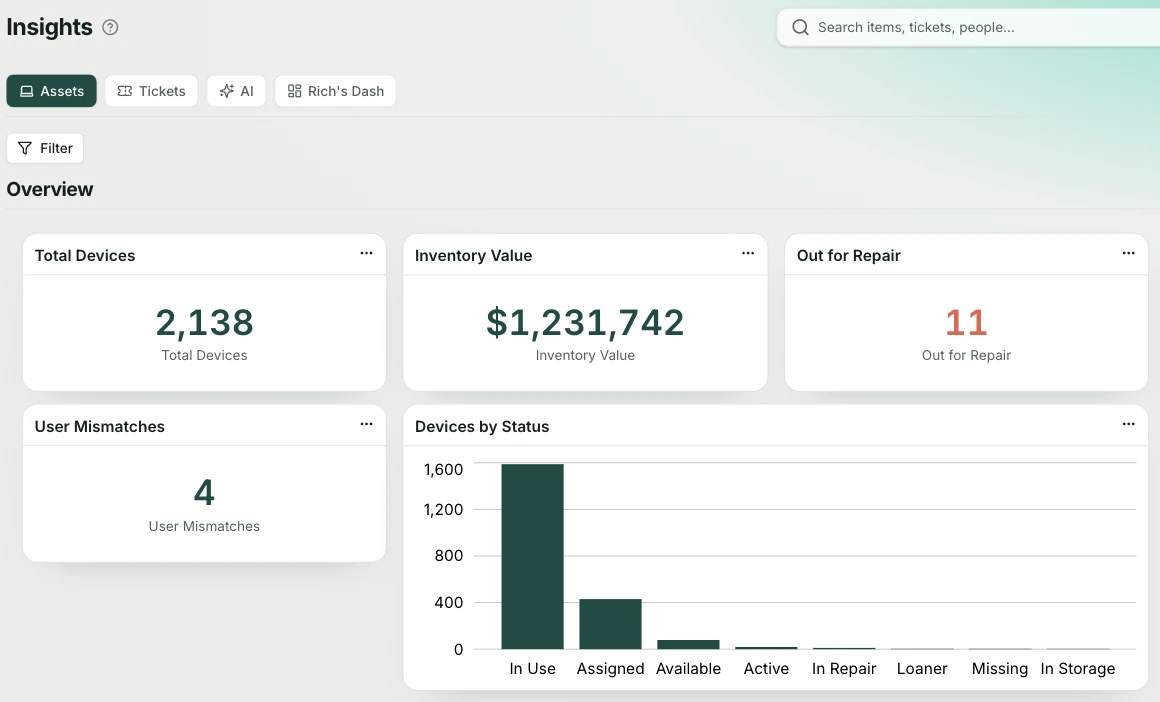
schoolOS Insights dashboard showing total devices, inventory value, devices out for repair, user mismatches, and devices by status